Agent traffic inspector

See exactly what your
coding agent sends to the model

A lightweight local reverse-proxy + web dashboard for Claude Code, Codex, DeepSeek-TUI, Reasonix, Kimi, OpenCode, Ollama, OpenRouter, and more.

Install & run
$ npm install -g ccglass
$ ccglass claude   # wrap Claude Code
$ ccglass codex   # or Codex
$ ccglass       # interactive picker
Node ≥ 18 No runtime deps for core No CA certs needed MIT license Light & dark theme
http://127.0.0.1:57633
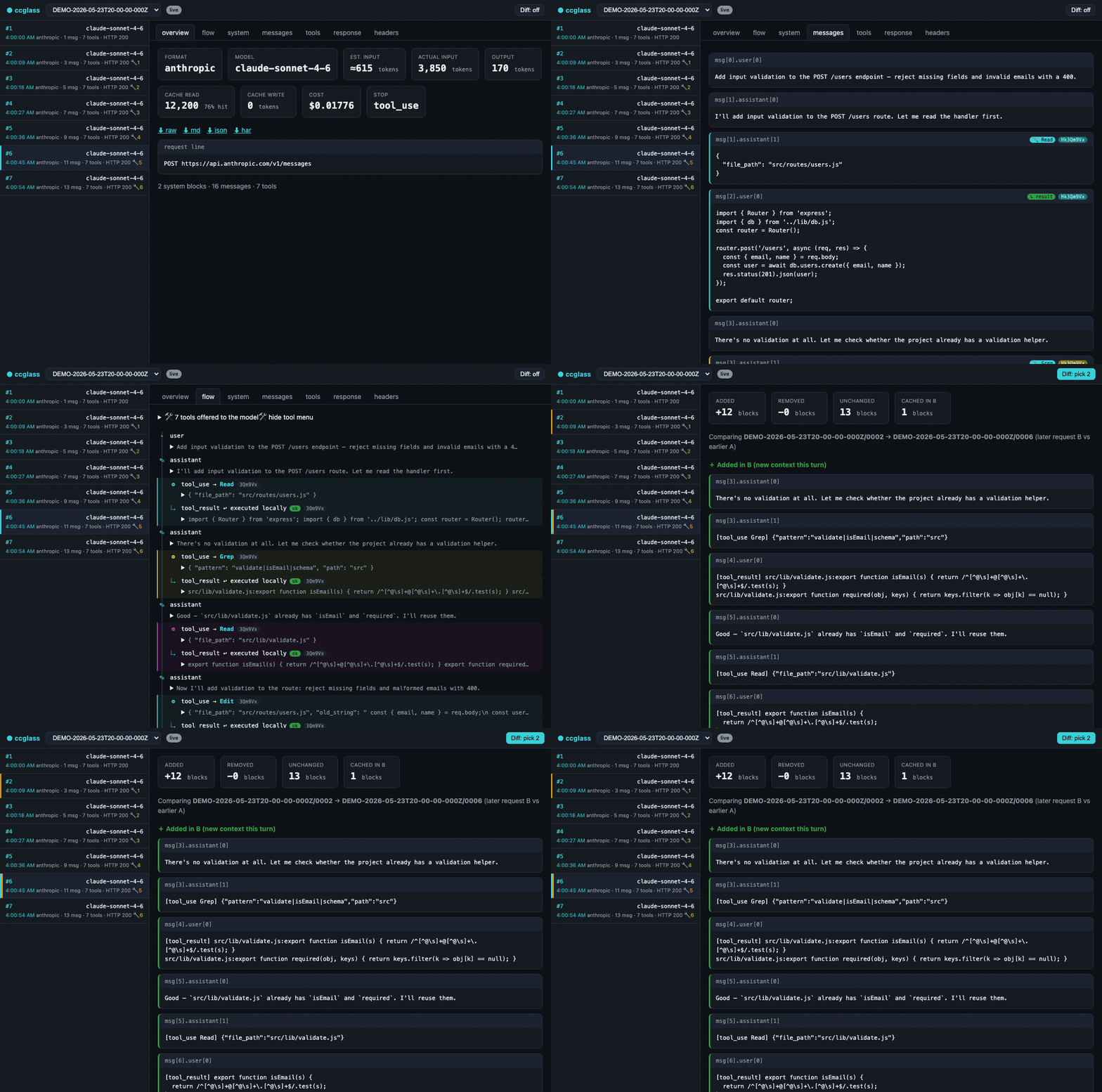
ccglass dashboard — live request capture, token/cache/cost, message history with tool calls, the agent-loop flow view, and a turn-to-turn diff

The problem

These CLIs ignore your proxy settings

Claude Code, Codex, and friends are Node/native apps that completely bypass HTTP_PROXY and HTTPS_PROXY — so Charles, mitmproxy, and fetch-patching tools simply never see the traffic.

ccglass sidesteps all of that. The client does HTTPS to the real API itself. You only intercept the plain HTTP hop to localhost. No CA certificates to install, no TLS pinning to fight, no install root certs in every new terminal.

The ccglass approach

One plain HTTP hop to localhost

Set the agent's base-URL env var to point at the local proxy. The agent does TLS to the real API; you watch the plaintext request on localhost.

# What ccglass does internally for you: ANTHROPIC_BASE_URL=http://127.0.0.1:PORT \ claude # ← agent handles HTTPS to api.anthropic.com # ← ccglass reads the plaintext hop # ← dashboard shows everything

Dashboard features

Everything in the request,
laid bare

Full system prompts. Every tool schema. Message history. Token, cache, and cost numbers. Turn-to-turn diffs. All of it, in real time.

Live request stream
Every call appears instantly. Click to expand the system prompt, messages, and tools. Long blocks fold behind a toggle. Timestamp and tool-call count on each row.
🗺
Conversation flow diagram
Top-to-bottom sequence diagram of the agent loop. Tool use and tool result paired by call_id and color-coded. Skill calls flagged.
Turn-to-turn diff
Pick two requests, see exactly what context was added this turn and which blocks carry a cache breakpoint. Understand prompt inflation at a glance.
💰
Token / cache / cost
Exact input, output, and cache tokens from the response usage object. Cache-hit rate percentage. Estimated USD per request with per-provider pricing.
📤
Response export
Streamed SSE rebuilt into the final message with stop reason, tool calls, and usage. Export any request as raw HTTP transcript, Markdown, JSON, or HAR.
Per-request latency
End-to-end time on each list row. Overview shows total time, TTFT, generation window, and approximate input/output tokens per second.
🔬
MCP self-inspection
When wrapping Claude Code, ccglass exposes itself as an MCP server so Claude can inspect the live traffic directly from within a session.
📊
Session summary
Rolled-up input and output tokens, cache-hit percentage, and estimated cost across the full session. Filter per-model from the session picker.
🌓
Light & dark theme
Toggle between light and dark modes in the dashboard. Per-model filter, session stats, latency trend, and error counts all respect the theme.

How it works

One command wraps
the entire agent loop

01

Install globally once

npm install -g ccglass puts the binary in your PATH. No runtime dependencies for the core proxy. The optional MCP self-inspection feature pulls in @modelcontextprotocol/sdk and zod.

02

Run with the client name

ccglass claude starts a local proxy, sets ANTHROPIC_BASE_URL to point at it, then launches Claude Code. Pick from the interactive menu or name the provider directly.

03

Dashboard opens automatically

The local dashboard opens in your browser. Every API request the agent makes appears in real time — system prompt, tools, messages, tokens, cost.

04

Use the agent normally

Work in your coding agent exactly as you normally would. ccglass is entirely transparent — the proxy forwards all traffic faithfully; nothing is modified, nothing is blocked. Ctrl-C to stop.

In your terminal
# Interactive picker — no arguments needed
$ ccglass
Which client do you want to inspect?
1) Claude Code
2) Codex (OpenAI)
3) DeepSeek-TUI
4) Reasonix
5) Kimi (Moonshot)
6) OpenCode
> 1
ccglass watching Claude Code → api.anthropic.com
dashboard: http://127.0.0.1:57633
(Ctrl-C to stop)
# Or name it directly:
$ ccglass claude
$ ccglass codex
$ ccglass ollama

Supported providers

Works with the tools
you already use

Built-in support for every major AI coding agent and model provider. Custom providers via the generic ccglass run escape hatch.

Command Wraps Env var set Format
ccglass claude Claude Code ANTHROPIC_BASE_URL Anthropic
ccglass codex Codex (OpenAI) OPENAI_BASE_URL OpenAI
ccglass deepseek DeepSeek-TUI dispatcher DEEPSEEK_BASE_URL OpenAI
ccglass deepseek-tui DeepSeek-TUI runtime DEEPSEEK_BASE_URL OpenAI
ccglass reasonix Reasonix DEEPSEEK_BASE_URL OpenAI
ccglass kimi Claude Code → Moonshot ANTHROPIC_BASE_URL Anthropic
ccglass opencode OpenCode OPENAI_BASE_URL OpenAI
ccglass ollama Any Ollama-backed client OPENAI_BASE_URL Local
ccglass lmstudio Any LM Studio-backed client OPENAI_BASE_URL Local
ccglass openrouter Any OpenRouter client OPENAI_BASE_URL OpenAI
ccglass bedrock Claude Code → AWS Bedrock ANTHROPIC_BEDROCK_BASE_URL Anthropic
ccglass vertex Claude Code → Google Vertex ANTHROPIC_BASE_URL Anthropic
ccglass glm Any GLM/Zhipu client OPENAI_BASE_URL OpenAI
ccglass run --provider <p> -- <cmd> Any client with a base-URL env var per provider / --env-var OpenAI

IDE extensions

Works with Cursor, Cline, and Continue.dev too

IDE extensions that let you configure a custom API base URL can be inspected with ccglass proxy — it starts the proxy and dashboard without spawning any child process.

# For OpenAI-compatible IDEs (Cursor BYOK, Cline, Continue…) ccglass proxy --provider openai # For Anthropic-compatible IDEs ccglass proxy --provider claude
Cursor (BYOK) Cline Continue.dev Copilot Chat (custom)
Note: works in BYOK / custom-API-key mode only. Cursor's built-in subscription routes through api2.cursor.sh and cannot be intercepted this way.
Output
$ ccglass proxy --provider openai
ccglass proxy → https://api.openai.com
Set your IDE's API base URL to:
http://127.0.0.1:57101
dashboard: http://127.0.0.1:57633
(Ctrl-C to stop)